Selection and measurement how-to showstopper...

Previous Topic Next Topic
 
classic Classic list List threaded Threaded
2 messages Options
Reply | Threaded
Open this post in threaded view
|

Selection and measurement how-to showstopper...

elfoxyt0
Hello,

I'm trying to start with very simple actions: import an image and scale it so that I can read the real position of any point in mm. Import is fine. Then, I try to measure the distance between two points. I select the |<--?-->| icon. I get the message: Specify the first point. I click and see a small red spot with the message: Specify the second point. I select a second point, but get: Specify the first point.
Other question. I was able to create points. They are either showed as a red dash rectangle, or a white rectangle with a circle inside. Which one represents a selected object? Trying to create a line between the two points gives the same result as above.
Tried the help/duckduckgo/forums but couldn't find any answers.
Any help welcome.
Thx
Reply | Threaded
Open this post in threaded view
|

Re: Selection and measurement how-to showstopper...

sand1024
This post was updated on .
well, which version of LibreCAD do you use?

The distance measuring action simply produces output of measured value into Cmd widget - please check whether some output is present there.

In 2.2.2-alpha (https://github.com/LibreCAD/LibreCAD/releases/tag/2.2.2_alpha-latest) there is a "Informational Cursor" tool that provides indication of distance between points in visual way near to cursor.

Something like:
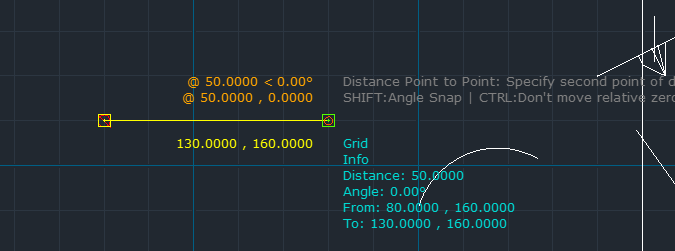
 

As for the second question - sorry, I not sure I got your point. Which command do you use for creation of line?

Btw, are you sure that your current layer is not hidden? Potentially, if you don't see the line - it might be created, yet if the layer is hidden - it will not be visible.
