copy paste without losing original layer of the object when pasting on another layer

Previous Topic Next Topic
 
classic Classic list List threaded Threaded
7 messages Options
Reply | Threaded
Open this post in threaded view
|

copy paste without losing original layer of the object when pasting on another layer

Decoril
Until now i were using a very old version of LibreCad but installed a new version latest and some other recent but now when I have an object with its layer property can not mantain the property, it always change the pasted object layer property to the new layer were i am pasting ir, but in the old version i had (and i do not even remember or have it here now) when I pasted anything the objects mantained the original layer property even if pasting on another Layer, How in this world can i just paste anithing in a layer without losing the layer property it had when i copied it?
Thank you very much in advance...
Reply | Threaded
Open this post in threaded view
|

Re: copy paste without losing original layer of the object when pasting on another layer

Urstein
Hello.
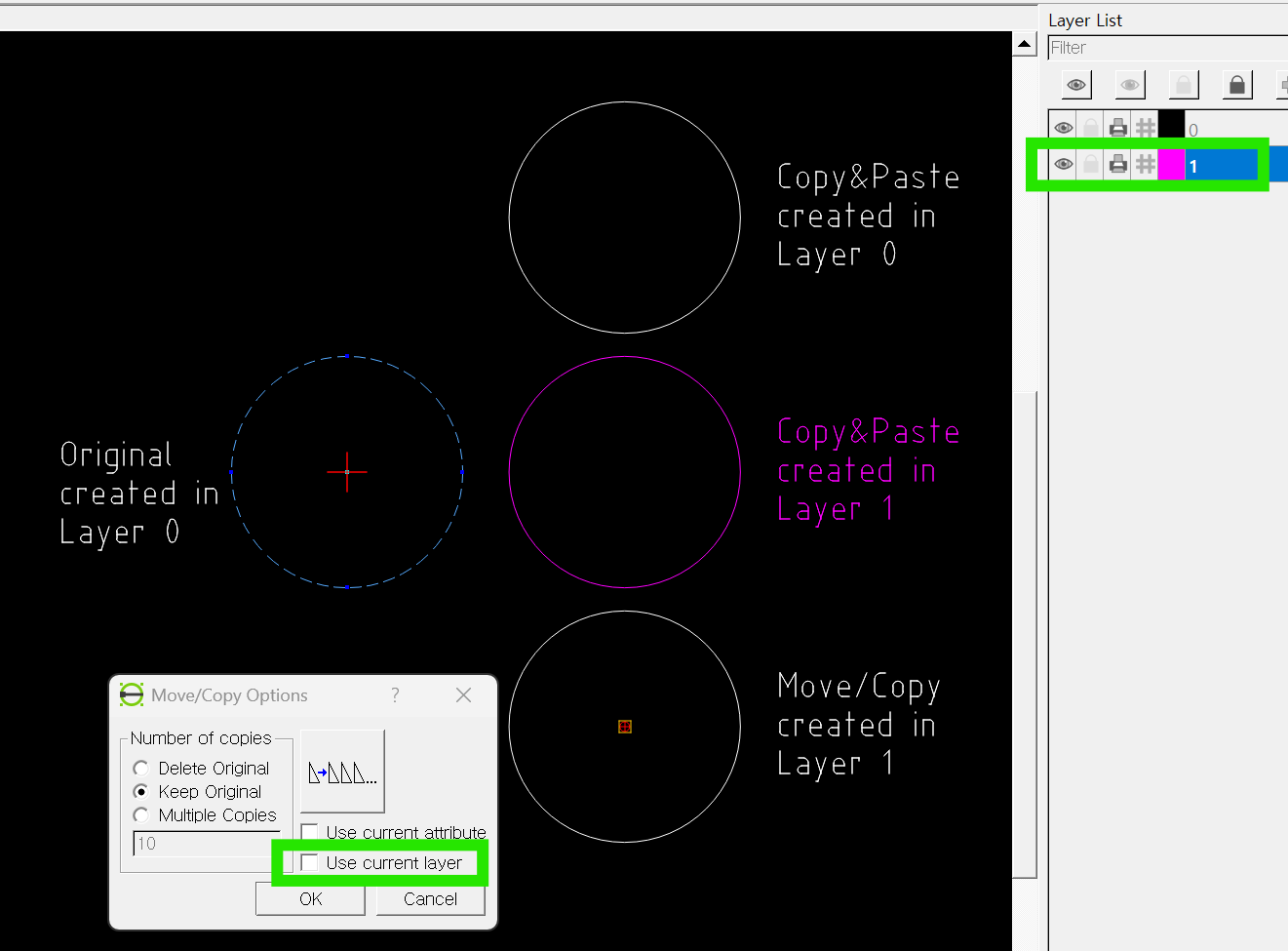
It seems that when you executed copy & paste, the selected layer(=current layer) was not the target layer (here, Layer 0) but another one (here, Layer 1).
To keep the original object on the same layer when copying, you need to select the layer in the layer list where the original belongs.
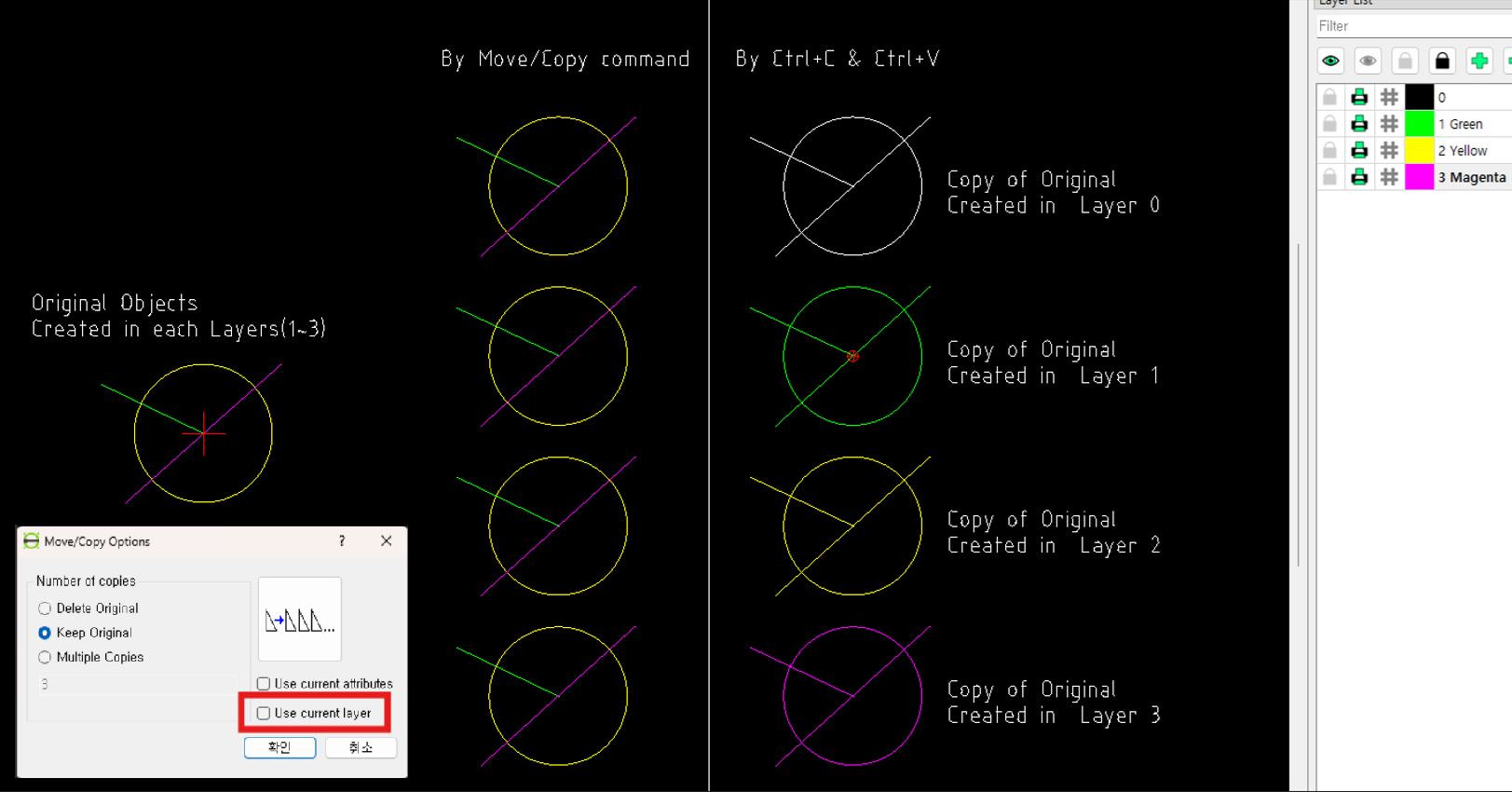
Alternatively, instead of using Ctrl+C & Ctrl+V, you can use the Move/Copy command. If you leave “Use current layer” unchecked when copying, the copied object will remain on the same layer as the original, regardless of the currently selected layer.
Reply | Threaded
Open this post in threaded view
|

Re: copy paste without losing original layer of the object when pasting on another layer

Decoril
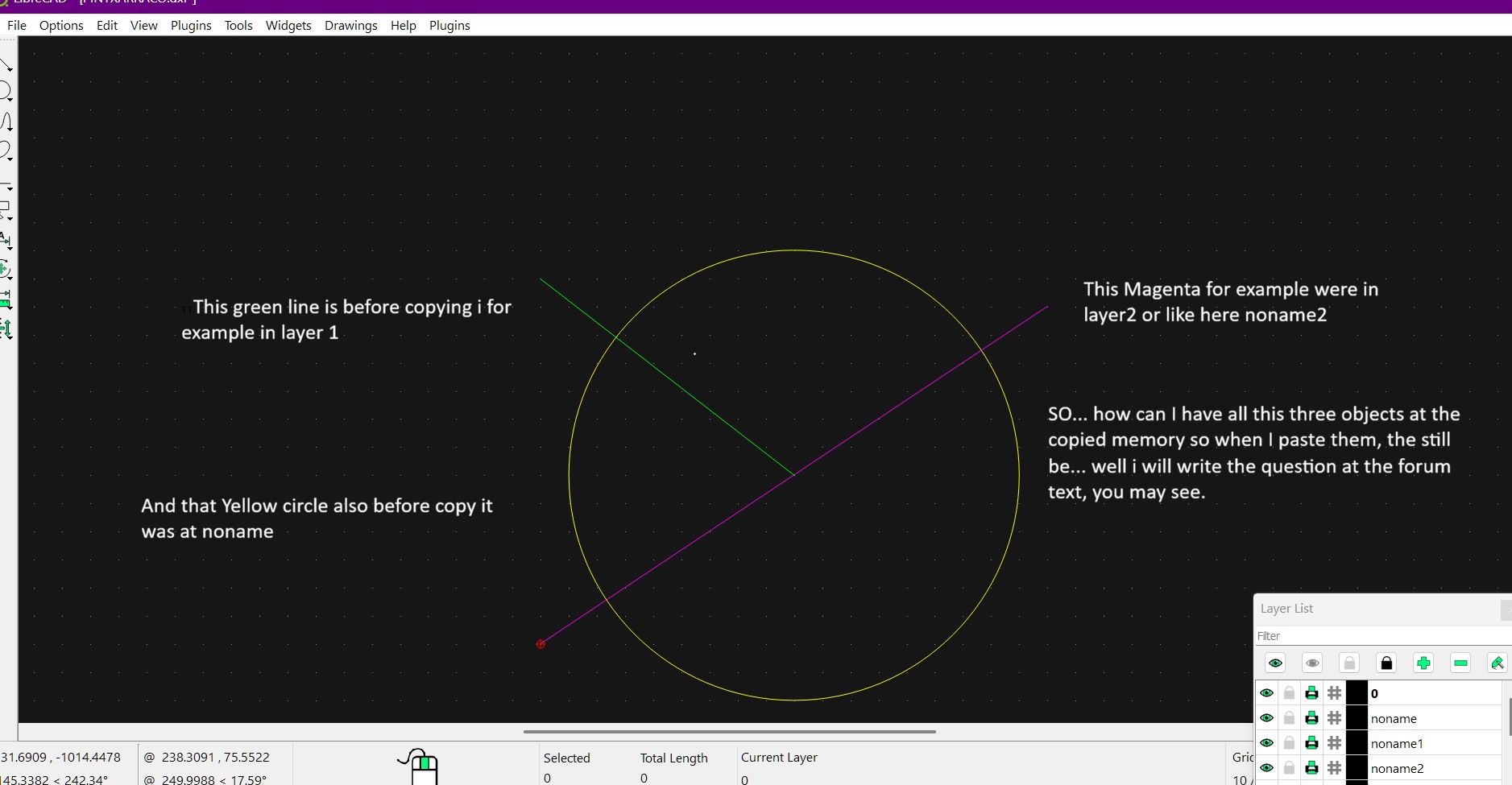
How can I copy three or more objects to the copy-paste memory so that when I paste them, regardless of the layer I paste them on, each one retains its original layer identity? Each object should be from a different layer, but when pasted, they should maintain their original layer identity, even if they are on a different layer. For example, when pasted onto layer x, they shouldn't all become part of layer x, but should retain their original layer identity. This way, I can temporarily hide one object by clicking the eye icon of its original layer, while the others remain visible. In other words, I don't want them to lose their original layer identity simply by being pasted onto a single layer, since I obviously can't have them on multiple layers simultaneously.

Thank you very much, and sorry for not explaining myself clearly before.
Reply | Threaded
Open this post in threaded view
|

Re: copy paste without losing original layer of the object when pasting on another layer

Urstein
This post was updated on .
Instead of using Ctrl+C and Ctrl+V, when you use the Move/Copy command without checking ‘Use current layer,’ the copied objects will remain on their original layers regardless of the currently selected layer

CopyObjectByMoveCopy.dxf

- - - - - - - - -
EDIT same day
I attached an example DXF file, but I’m not sure whether it can be downloaded.
When I click the attached file, it does not download; instead, the following screen appears.

- - - - - - - - -
EDIT 2026.5.3
https://forum.librecad.org/How-can-I-download-attached-DXF-files-from-the-forum-td5729524.html
If you copy the text into Notepad and save it as a DXF file, you can open it in LibreCAD.

More simply (in the case of Windows), you can just right‑click in the text area shown in the web browser and choose “Save as...” to directly download it as a DXF file.
Reply | Threaded
Open this post in threaded view
|

Re: copy paste without losing original layer of the object when pasting on another layer

Decoril
Ok, thank you anyway.
Reply | Threaded
Open this post in threaded view
|

Re: copy paste without losing original layer of the object when pasting on another layer

sand1024
this functionality was broken in one of 2.2.1.x releases.

I will be restored in 2.2.2-alpha branch (that should be available next week or so).

Btw, which exact version of LC do you use?
Reply | Threaded
Open this post in threaded view
|

Re: copy paste without losing original layer of the object when pasting on another layer

Decoril
I encountered that it was not working a few days ago when i decided to install the latest "estable version, but now I just installed some version from the year 2023 and now it is perfectly working again, also i had alot of crashes with the program just shutting off in my face with the latests versions, i tryed the last two "estable avaliables, but reinstalling Version: 2.2.0.1
Compiler: GNU GCC 13.1.0
Compiled on: Jul  8 2023
Qt Version: 5.12.11
Boost Version: 1.75.0

Now i can continue great with my works, thank you and sure you will end getting all that things ok, i mean regards and this is a great program dont worry, gcontinue improving it i like it a lot, Bye!