Re : Re: vertical lines
Posted by klaxon on
URL: https://forum.librecad.org/Re-Re-vertical-lines-tp5715985.html

If you just want to draw "by hand" you can restrict the movement to vertical.
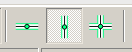
Or in the command line next point "@0,something"
Please explain the problem more detailed. You should study the manual. It's a bit outdated, but still useful for the basics.
URL: https://forum.librecad.org/Re-Re-vertical-lines-tp5715985.html
Thank's for answer.
It's the first time I use this software.
I've red the manual, but ...
I can only draw circles and lines on the uniq horizontal line that red cross can't live.
Even rectangles are drawn as a single line over the horizontal reference line.
circles can only be drawn with the center on the horizontal reference line.
In other words, what's the command that should permit me to move the little red cross away from the horizontal reference line ?
I've not found.
----- Mail d'origine -----
De: dellus [via LibreCAD] <[hidden email]>
À: klaxon <[hidden email]>
Envoyé: Mon, 07 May 2018 12:06:29 +0200 (CEST)
Objet: Re: vertical lines
De: dellus [via LibreCAD] <[hidden email]>
À: klaxon <[hidden email]>
Envoyé: Mon, 07 May 2018 12:06:29 +0200 (CEST)
Objet: Re: vertical lines
Do you mean the command "Vertical Line"? Watch the Tools Options Bar and set the length.
If you just want to draw "by hand" you can restrict the movement to vertical.
Or in the command line next point "@0,something"
Please explain the problem more detailed. You should study the manual. It's a bit outdated, but still useful for the basics.
If you reply to this email, your message will be added to the discussion below:
http://forum.librecad.org/vertical-lines-tp5715976p5715977.html| Free forum by Nabble | Edit this page |