Copy paste problem in LibreCAD-v2.2.1.3

Previous Topic Next Topic
 
classic Classic list List threaded Threaded
16 messages Options
Reply | Threaded
Open this post in threaded view
|

Copy paste problem in LibreCAD-v2.2.1.3

onur
I just install LibreCAD-v2.2.1.3 and copy paste works not expected. Pasted objects always much smaller than original. I downgraded to LibreCAD-v2.2.1.2-14 and its working as usual.

To reproduce just draw a circle and try to paste it to the same drawing.

Thanks.
onur
Reply | Threaded
Open this post in threaded view
|

Re: Copy paste problem in LibreCAD-v2.2.1.3

dxli
I will look into this one.

Looks like 2.2.1.4 is expected sooner than expected.

onur wrote
I just install LibreCAD-v2.2.1.3 and copy paste works not expected. Pasted objects always much smaller than original. I downgraded to LibreCAD-v2.2.1.2-14 and its working as usual.

To reproduce just draw a circle and try to paste it to the same drawing.

Thanks.
onur
Reply | Threaded
Open this post in threaded view
|

Re: Copy paste problem in LibreCAD-v2.2.1.3

dxli
In reply to this post by onur
hi onur,

could you provide detailed steps to reproduce this issue?

Tools > Modify > Move/Copy works smoothly here.

onur wrote
I just install LibreCAD-v2.2.1.3 and copy paste works not expected. Pasted objects always much smaller than original. I downgraded to LibreCAD-v2.2.1.2-14 and its working as usual.

To reproduce just draw a circle and try to paste it to the same drawing.

Thanks.
onur
Reply | Threaded
Open this post in threaded view
|

Re: Copy paste problem in LibreCAD-v2.2.1.3

onur
hi dxli,

Sorry, I should have done that in the first place. You're right. MOVE/COPY command works correct. I was using Copy(CTRL+C) and Paste(CTRL+V) from Edit toolbar.

I'm new to CAD and LibreCAD, so sorry if this is a rookie mistake.
Reply | Threaded
Open this post in threaded view
|

Re: Copy paste problem in LibreCAD-v2.2.1.3

dxli
Ctl-C/Ctl-V needs some fixes.

@sand1024, just wondering whether you can look into this one.

2.2.1.4 should be released after this one is fixed.

onur wrote
hi dxli,

Sorry, I should have done that in the first place. You're right. MOVE/COPY command works correct. I was using Copy(CTRL+C) and Paste(CTRL+V) from Edit toolbar.

I'm new to CAD and LibreCAD, so sorry if this is a rookie mistake.
Reply | Threaded
Open this post in threaded view
|

Re: Copy paste problem in LibreCAD-v2.2.1.3

flywire
In reply to this post by onur
onur wrote
MOVE/COPY command works correct. I was using Copy(CTRL+C) and Paste(CTRL+V) from Edit toolbar.

I'm new to CAD and LibreCAD, so sorry if this is a rookie mistake.
Normally Copy(CTRL+C) current object, use can move (even to different application), and Paste(CTRL+V).

First impression feedback is great, obviously regular users can't do it.
Reply | Threaded
Open this post in threaded view
|

Re: Copy paste problem in LibreCAD-v2.2.1.3
dxli
In reply to this post by onur
I have fixed Ctl-C/Ctl-V in 2.2.1 the branch. The 2.2.1.4 release is expected soon.

onur wrote
hi dxli,

Sorry, I should have done that in the first place. You're right. MOVE/COPY command works correct. I was using Copy(CTRL+C) and Paste(CTRL+V) from Edit toolbar.

I'm new to CAD and LibreCAD, so sorry if this is a rookie mistake.
Reply | Threaded
Open this post in threaded view
|

Re: Copy paste problem in LibreCAD-v2.2.1.3

onur
Hi Dongxu Li,

I've test this release, and still get much smaller copy of the original object.

Version: v2.2.1.3-4-g35be9afde
Compiler: Microsoft Visual C++
Compiled on: Jan 24 2026
Qt Version: 5.15.2
Boost Version: 1.87.0
System: Windows 10 Version 2009
Reply | Threaded
Open this post in threaded view
|

Re: Copy paste problem in LibreCAD-v2.2.1.3

onur
Still not working on latest release on windows.
Reply | Threaded
Open this post in threaded view
|

Re: Copy paste problem in LibreCAD-v2.2.1.3

enorby
I see the same issue using

Version: v2.2.1.4-5-g5e3134ab8
Compiler: GNU GCC 13.3.0
Compiled on: Mar 18 2026
Qt Version: 5.15.13
Boost Version: 1.83.0
System: Ubuntu 24.04.4 LTS

But it is only a problem when 'Main Drawing Unit' is set to 'Inch', and using CTRL+C ... CTRL+V.
Seems the pasted entities are reduced by a factor of 25.4....  that number rings a bell :-)


Furthermore if the selected entities are in multiple layers, they are all merged in to one layer (the current) when pasting, regardless of the Main Drawing Unit settings. I don't know if the is the intended behaviour.

For reference (Kubuntu 24.04 LTS)

Version: 2.2.0-undef
Compiler: GNU GCC 13.2.0
Compiled on: Apr  8 2024
Qt Version: 5.15.13
Boost Version: 1.83.0
System: Ubuntu 24.04.4 LTS

Doesn't have any of the above two issues. It will scale correctly and preserve all layers, even when pasting into another document, same session.


Reply | Threaded
Open this post in threaded view
|

Re: Copy paste problem in LibreCAD-v2.2.1.3

dxli
Thanks a lot for enorby's troubleshooting.

This is indeed a bug, and I have fixed this in both 2.2.1 and master branches.

https://github.com/LibreCAD/LibreCAD/releases/tag/2.2.2_alpha-latest

https://github.com/LibreCAD/LibreCAD/releases/tag/2.2.1-latest

enorby wrote
I see the same issue using

Version: v2.2.1.4-5-g5e3134ab8
Compiler: GNU GCC 13.3.0
Compiled on: Mar 18 2026
Qt Version: 5.15.13
Boost Version: 1.83.0
System: Ubuntu 24.04.4 LTS

But it is only a problem when 'Main Drawing Unit' is set to 'Inch', and using CTRL+C ... CTRL+V.
Seems the pasted entities are reduced by a factor of 25.4....  that number rings a bell :-)


Furthermore if the selected entities are in multiple layers, they are all merged in to one layer (the current) when pasting, regardless of the Main Drawing Unit settings. I don't know if the is the intended behaviour.

For reference (Kubuntu 24.04 LTS)

Version: 2.2.0-undef
Compiler: GNU GCC 13.2.0
Compiled on: Apr  8 2024
Qt Version: 5.15.13
Boost Version: 1.83.0
System: Ubuntu 24.04.4 LTS

Doesn't have any of the above two issues. It will scale correctly and preserve all layers, even when pasting into another document, same session.
Reply | Threaded
Open this post in threaded view
|

Re: Copy paste problem in LibreCAD-v2.2.1.3

enorby
Thank you for fixing the scale problem! :-)

It does not fix the layers problem however (as far as I can tell).

- If I mark some entities from more than one layer.
- Copy them using CTRL+C
- Specify the reference point
- Paste it in the same drawing or another drawing - all entities are merged into the same layer.


This does not happen in 2.2.0.
If pasting in the same drawing all entities are pasted into the right layers.
If pasting in another drawing missing layers are automatically created and all entities are pasted into the correct layers.
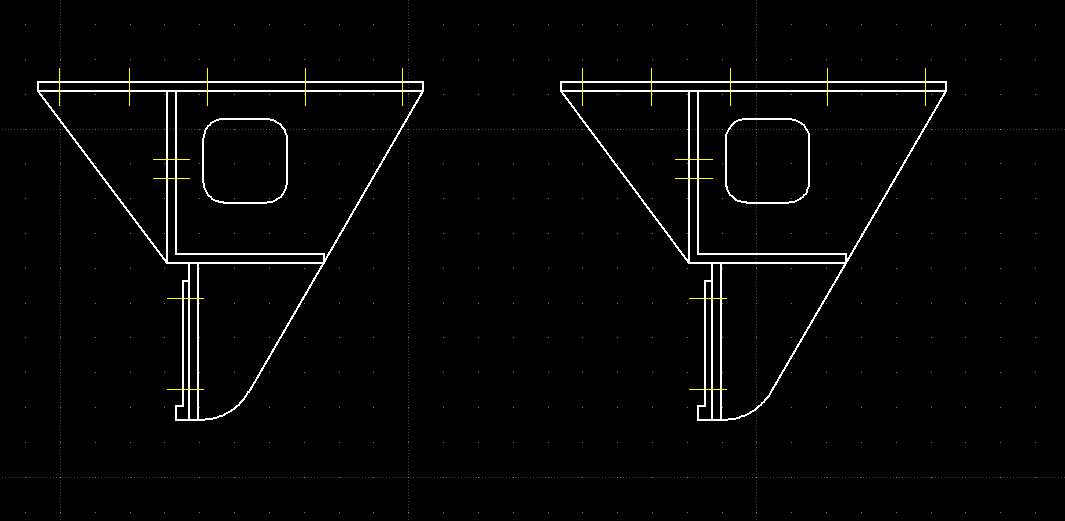
Below I just pasted into the same drawing and that works.


Is the new behaviour really the intended one?
Reply | Threaded
Open this post in threaded view
|

Re: Copy paste problem in LibreCAD-v2.2.1.3

dxli
hi enorby:

There are two styles:

1. all copied entities are moved to the current active layer;
2. all copied entities keep their own layer.

Looks like the second choice is more popular.

If there's no objection, we can modify the behavior to style 1 (For 2.2.1 branch and for the master branch).

enorby wrote
Thank you for fixing the scale problem! :-)

It does not fix the layers problem however (as far as I can tell).

- If I mark some entities from more than one layer.
- Copy them using CTRL+C
- Specify the reference point
- Paste it in the same drawing or another drawing - all entities are merged into the same layer.


This does not happen in 2.2.0.
If pasting in the same drawing all entities are pasted into the right layers.
If pasting in another drawing missing layers are automatically created and all entities are pasted into the correct layers.
Below I just pasted into the same drawing and that works.


Is the new behaviour really the intended one?
Reply | Threaded
Open this post in threaded view
|

Re: Copy paste problem in LibreCAD-v2.2.1.3

enorby
Hi dxli

I'm biased towards style #2. When copying multiple entities from multiple layers it is very tedious to but them back where they belong after the fact.

If one wants to put them in the same layer it is fairly simple to achieve that using e.g. tools->modify->attributes and simply move them all to the same layer.

In case I have a vote I would vote for style 2, where all copied entities keep their own layer, both when pasting in to the same document or another document.... :-)


Reply | Threaded
Open this post in threaded view
|

Re: Copy paste problem in LibreCAD-v2.2.1.3

sand1024
@enorby

I'm not sure that there should be one default behavior. Both approaches above has own benefits and drawback, so probably there should be two different commands for pasting (to one or to original layers).

The approach with saving layers structure actually is more complex if copy/paste operation is performed between different documents.  For example:

1) if there is no layer in target document - it should be created with all attributes of original layer. Ok, so far it's ok.

2) But what if both documents contains the layer with the same name, yet with totally different attributes? It is clear that layer will not be created, yet the visual representation of entities (if their attributes are set to "By Layer" will be changed (and that may affect the semantics of appropriate drawings elements)

Also, as a side effect - if the user will move entities  from originally copied ones to layers of the document,  as result of such a copy/paste operations potentially empty layers will occur.  

With pasting blocks that may also contains layers - the situation may become even more interesting...

So for me it should be rather up to the user to decide which strategy for paste should be used - with persisting layers structure or not.
Reply | Threaded
Open this post in threaded view
|

Re: Copy paste problem in LibreCAD-v2.2.1.3

flywire
Surely CTRL+V should be paste on current layer. Change layer if you want to paste to a different layer.