Drawings have certain font characters with extra lines when printed

Previous Topic Next Topic
 
classic Classic list List threaded Threaded
3 messages Options
Reply | Threaded
Open this post in threaded view
|

Drawings have certain font characters with extra lines when printed

bobair
I have been using LibreCAD for a couple years now.  Thanks to the community that supports this tool!  It is an excellent tool for general design of many things.  Again THANKS!

I happened to have come across a peculiar printing problem(?) when using LibreCAD printing features.  In short the numbers "3", "6" and "9" print with extra vertical or diagonal lines in the character.  If exported to PDF it also has these extra vertical or diagonal lines. See attached image.  I am using the standard font in these drawings.  I changed the fonts to some other font and these extra lines may or may not appear depending on the font selected.  These extra lines do not appear in Print Preview only when actual printing is done or printed to a PDF file.
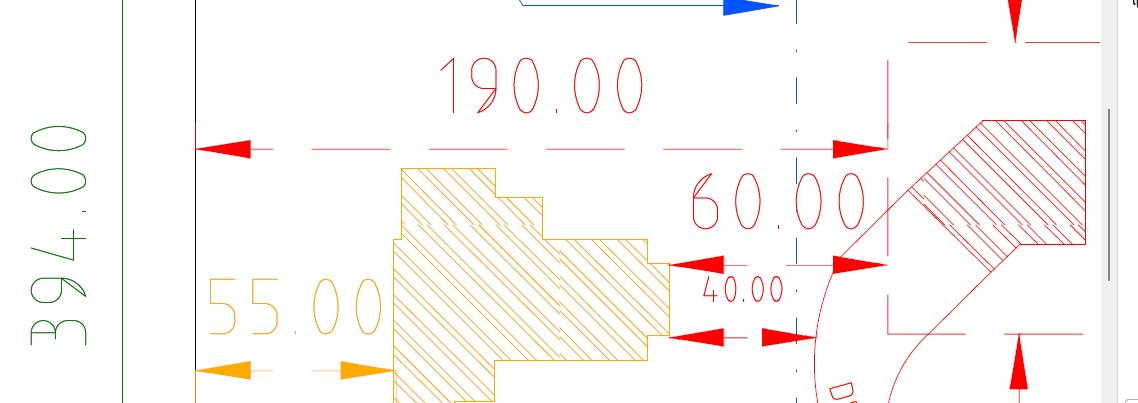


Using LibreCAD version 2.2.1.
Reply | Threaded
Open this post in threaded view
|

Re: Drawings have certain font characters with extra lines when printed

dxli
hi bobair,

are you running the latest 2.2.1.x builds?

https://github.com/LibreCAD/LibreCAD/releases/tag/2.2.1-latest

You may also try our latest development builds:

https://github.com/LibreCAD/LibreCAD/releases/tag/2.2.2_alpha-latest

If the issue is not fixed in the latest builds of either branch, please upload a minimum dxf file with this issue, and the exact steps to reproduce.

BTW, you may export to pdf, print to pdf, or use our command line option: dxf2pdf

bobair wrote
I have been using LibreCAD for a couple years now.  Thanks to the community that supports this tool!  It is an excellent tool for general design of many things.  Again THANKS!

I happened to have come across a peculiar printing problem(?) when using LibreCAD printing features.  In short the numbers "3", "6" and "9" print with extra vertical or diagonal lines in the character.  If exported to PDF it also has these extra vertical or diagonal lines. See attached image.  I am using the standard font in these drawings.  I changed the fonts to some other font and these extra lines may or may not appear depending on the font selected.  These extra lines do not appear in Print Preview only when actual printing is done or printed to a PDF file.


Using LibreCAD version 2.2.1.
Reply | Threaded
Open this post in threaded view
|

Re: Drawings have certain font characters with extra lines when printed

bobair
Ah!  Should have downloaded the latest release before suggesting "Houston...we have a problem".  v2.2.1.3-10-g0dd53e2f8 fixes my reported font problem. I had other dxf files that I printed over the last couple of years but they didn't have as many "3", "6" and "9" characters.  But they too printed with the extra lines in them.  Is the dxf2pdf command only allowed in unix?  When I type dxf2pdf in Cmd window I get Unknown command: dxf2pdf.  I'm running MS Windows 11.

Thank you!

