Fonts are not installed

Next Topic
 
classic Classic list List threaded Threaded
2 messages Options
Reply | Threaded
Open this post in threaded view
|

Fonts are not installed

ltribble.nc
I installed this version:

Version: v2.2.1.2-17-g7f9a4dff5
Compiler: Microsoft Visual C++
Compiled on: Dec 14 2025
Qt Version: 5.15.2
Boost Version: 1.87.0
System: Windows 10 Version 2009

I don't see any 'fonts' folder.
The 'Text Style' dropdown is blank.
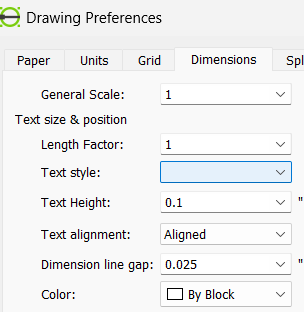
I've read that the 'path' must be set to point to the fonts folder but I can't find a folder that contains fonts to change my setting to.  I tried the generic "windows\fonts" folder but that did not work.

Where do I find the fonts for LibreCAD so that I can show dimensions and text on my drawings?
Reply | Threaded
Open this post in threaded view
|

Re: Fonts are not installed

ltribble.nc
I finally found the Fonts in github under support\fonts.  I manually downloaded 'standard.lff' and placed it in a directory on my PC.  Then changed the Application Settings \ Paths \ Fonts to point to this directory.  I restarted LibreCAD and now 'standard' shows in the Text Style and my dimensions and text show.

Hopefully this helps someone else.
