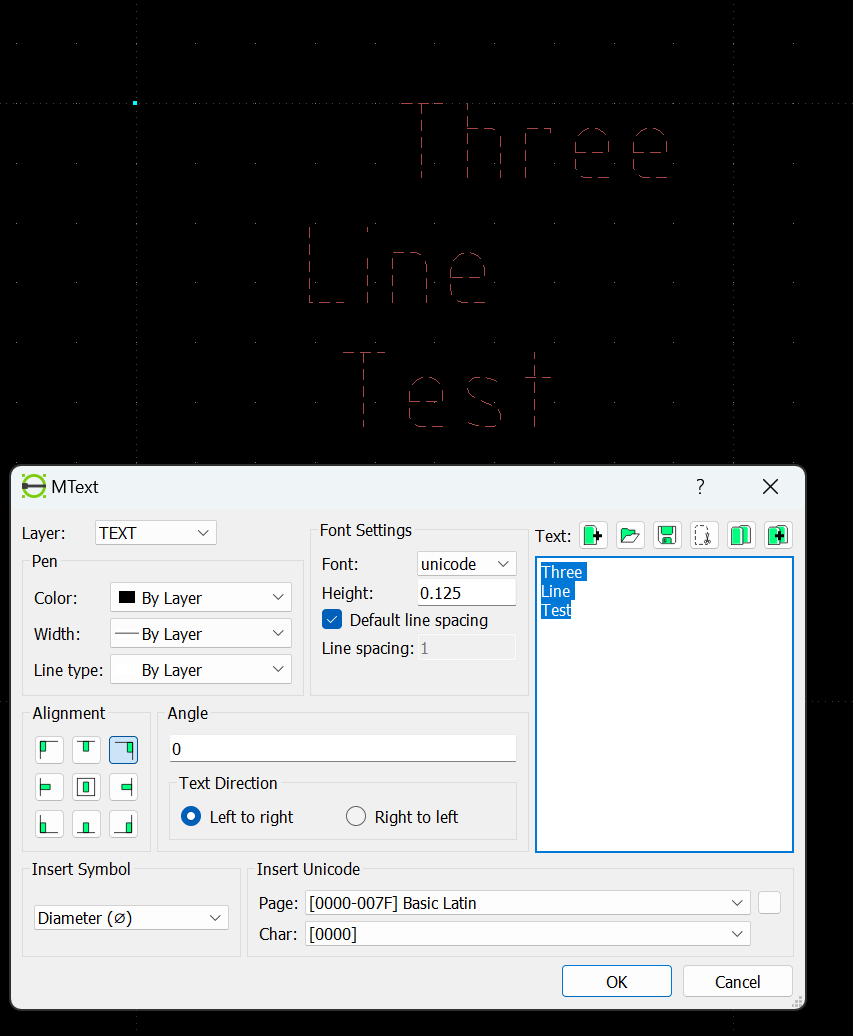
MTEXT alignment issue 2.2.1_rc2

Next Topic
 
classic Classic list List threaded Threaded
12 messages Options
Reply | Threaded
Open this post in threaded view
|

MTEXT alignment issue 2.2.1_rc2

pclem
Version: 2.2.1_rc2-1-g4cd3b138
Compiler: GNU GCC 13.2.0
Compiled on: May 13 2024

New user, upgraded to latest rc to the try the "right click to edit Block" feature but running into MTEXT alignment issue.

Reply | Threaded
Open this post in threaded view
|

Re: MTEXT alignment issue 2.2.1_rc2

dxli
We are going to fix this bug in 2.2.2.

The mtext is not easy to work with.

pclem wrote
Version: 2.2.1_rc2-1-g4cd3b138
Compiler: GNU GCC 13.2.0
Compiled on: May 13 2024

New user, upgraded to latest rc to the try the "right click to edit Block" feature but running into MTEXT alignment issue.

Reply | Threaded
Open this post in threaded view
|

Re: MTEXT alignment issue 2.2.1_rc2

LordOfBikes
Administrator
Why 2.2.2?
This is what release candidates are for, find errors and fix them for the final release.
MTEXT alignment works in 2.2.0, so it was broken with new features or refactoring.
Bisecting should locate the issue easy. In case it is not easy to fix, it needs to be reverted.
Just my 2 cent.

Armin
investing less than half an hour into Search function can save hours or days of waiting for a solution
Reply | Threaded
Open this post in threaded view
|

Re: MTEXT alignment issue 2.2.1_rc2

dxli
Part of my reasoning is actually already being mentioned by you.

Touching mtext code is never safe;
The fixing for mtext includes new feature: right-to-left;
We cannot simply revert some fixes: exposing a more serious bug, or breaking more features;
This issue is not serious enough for me to take immediate actions, user can workaround the issue by playing with text or alignment.

LordOfBikes wrote
Why 2.2.2?
This is what release candidates are for, find errors and fix them for the final release.
MTEXT alignment works in 2.2.0, so it was broken with new features or refactoring.
Bisecting should locate the issue easy. In case it is not easy to fix, it needs to be reverted.
Just my 2 cent.

Armin
Reply | Threaded
Open this post in threaded view
|

Re: MTEXT alignment issue 2.2.1_rc2

LordOfBikes
Administrator
Sorry, but I can't agree.
I'd rate a bug as certainly serious when it affects more than 90% of the users.
I have no proof for the >90%, just a guess and this is no rating or devaluing of right-to-left writing folks.

The bug, as I understand, breaks MTEXT even for existing drawings.
This will raise a bunch of issues with the new release, not only for us, but also for Linux distribution maintainers upgrading their repos.
Users request changes to reduce 4-click commands to 3-clicks or less for more efficiency. What will they do when they have to fiddle around with text alignment by trial and error to get a reasonable result for printing?
And workaround drawings, created with 2.2.1, have to be fixed for 2.2.2 again. Sound serious to me too.

We reached a new quality with the 2.2.0 release and it will be disappointing when we step back again.
Maybe we have to consider a better review process then to avoid having lower-quality pull request merged without sufficient review and testing. Once merged, the bad code get out of focus and hides in the huge code base, making it hard to debug and fix later.

It's our responsibility to take care of fixing bad pull requests or even decline them, when the concept is wrong or bad.
investing less than half an hour into Search function can save hours or days of waiting for a solution
Reply | Threaded
Open this post in threaded view
|

Re: MTEXT alignment issue 2.2.1_rc2

dxli
I added a fix to master:

1. New algorithms, instead of fixing the existing;
2. Not trying to minimize the changes;
3. A single commit, easier for backporting to 2.2.1, if determined to be safe.


LordOfBikes wrote
Sorry, but I can't agree.
I'd rate a bug as certainly serious when it affects more than 90% of the users.
I have no proof for the >90%, just a guess and this is no rating or devaluing of right-to-left writing folks.

The bug, as I understand, breaks MTEXT even for existing drawings.
This will raise a bunch of issues with the new release, not only for us, but also for Linux distribution maintainers upgrading their repos.
Users request changes to reduce 4-click commands to 3-clicks or less for more efficiency. What will they do when they have to fiddle around with text alignment by trial and error to get a reasonable result for printing?
And workaround drawings, created with 2.2.1, have to be fixed for 2.2.2 again. Sound serious to me too.

We reached a new quality with the 2.2.0 release and it will be disappointing when we step back again.
Maybe we have to consider a better review process then to avoid having lower-quality pull request merged without sufficient review and testing. Once merged, the bad code get out of focus and hides in the huge code base, making it hard to debug and fix later.

It's our responsibility to take care of fixing bad pull requests or even decline them, when the concept is wrong or bad.
Reply | Threaded
Open this post in threaded view
|

Re: MTEXT alignment issue 2.2.1_rc2

pclem
I tried the MTEXT alignment fix and it works ok. Thank you.
Reply | Threaded
Open this post in threaded view
|

Re: MTEXT alignment issue 2.2.1_rc2

pclem
In reply to this post by pclem
Posts to this thread and a few others by Robertbozic looks like spam to me.
Reply | Threaded
Open this post in threaded view
|

Re: MTEXT alignment issue 2.2.1_rc2

LordOfBikes
Administrator
Many thanks for reporting @pclem.

I missed the first two posts, with the misplaced links.
His email address is listed on Stop Forum Spam, so I kicked him out now.

Armin
investing less than half an hour into Search function can save hours or days of waiting for a solution
Reply | Threaded
Open this post in threaded view
|

Re: MTEXT alignment issue 2.2.1_rc2

dxli
Is it possible to make the first post by approval only?

We don't get much traffic, so not a burden here.

LordOfBikes wrote
Many thanks for reporting @pclem.

I missed the first two posts, with the misplaced links.
His email address is listed on Stop Forum Spam, so I kicked him out now.

Armin
Reply | Threaded
Open this post in threaded view
|

Re: MTEXT alignment issue 2.2.1_rc2

PetriK
In reply to this post by pclem
**Title:** MTEXT handling issues: text disappears on edit and explodes into geometry

**Environment:**

* LibreCAD version: (2.2.1.2)
* OS: (Windows 10)
* Source file: DXF converted from DWG using ODA File Converter (v25.11.0)

---

**Description:**

There are multiple issues related to MTEXT handling in LibreCAD when working with DXF files converted from DWG:

1. **MTEXT disappears when editing**

   * When editing an existing MTEXT entity and inserting a line break (Enter), the text disappears from the canvas.
   * The entity still exists but is no longer rendered correctly.

2. **MTEXT formatting codes are shown as raw text**

   * Text strings contain visible formatting codes such as:

     * `{\A1;...}`
     * `{\pql;\pt0;\fArial|b0|i0|c0|p34;...}`
     * `\pxl`
   * These should be interpreted as formatting, not displayed as literal text.

3. **Explode converts text into geometry**

   * Using *Modify → Explode* on MTEXT does not convert it into simple TEXT entities.
   * Instead, the text is converted into vector geometry (lines/arcs), making it non-editable.

---

**Expected behavior:**

* MTEXT should support basic editing, including line breaks.
* Formatting codes should be interpreted and hidden from the user.
* Explode should optionally convert MTEXT into TEXT entities (not only geometry).
* At minimum, MTEXT should degrade gracefully into editable TEXT.

---

**Actual behavior:**

* MTEXT becomes invisible after inserting a line break.
* Formatting codes remain visible and must be manually removed.
* Explode destroys text editability by converting it to raw geometry.

---

**Steps to reproduce:**

1. Convert a DWG file to DXF using ODA File Converter.
2. Open the DXF in LibreCAD.
3. Select an MTEXT entity.
4. Edit the text and insert a line break.
5. Observe that the text disappears.

Optional:
6. Use *Modify → Explode* on the same text.
7. Observe that the text becomes line geometry instead of editable text.

---

**Additional notes:**

* This issue is especially problematic in workflows involving DWG → DXF conversion.
* Many CAD tools rely on MTEXT, so lack of support causes data loss or manual rework.
* Users are forced to:

  * manually clean formatting codes
  * recreate text using single-line TEXT entities

---

**Suggested improvements:**

* Improve MTEXT parsing and rendering
* Support common MTEXT formatting tags
* Provide a “Convert MTEXT to TEXT” tool
* Prevent text from disappearing on edit

---

**Impact:**

This significantly affects interoperability with DWG-based workflows and makes LibreCAD difficult to use in real-world CAD-to-CAD or CAD-to-GIS pipelines.

---

Thank you for your work on LibreCAD!
Reply | Threaded
Open this post in threaded view
|

Re: MTEXT alignment issue 2.2.1_rc2

aman
That's a different issue of converting some DXF.

It was a FAQ question, and the answer was that LibreCAD does not support newer AutoCAD DFXs. Many years older are supported, the main reason being DFX is product of AutoDesk, and it changes rapidly

Links to FAQ and tutorials were at the top of the main page, but when logged today, did not see those.