|
Problems with the Rotate Tool in Debian
Hello, dear friends, I wanted to report a couple of problems. When I use the Rotate tool, for example, to rotate a square and align it with a straight reference line, the square isn't perfectly aligned. There's a slight, almost imperceptible misalignment that's only noticeable when zoomed in. This only happens on Debian Trixie; this problem doesn't exist on Windows. I'm using LibreCAD version 2.2.1.3, and the Align plugin is broken on both Debian trixie and Windows 10. |
|
This post was updated on .
Hello developers and users,
Sorry to insist on this topic. I am currently testing the latest version of LibreCAD (v2.2.1.3-12-gd1ca469c9) on Debian 13. I am trying to rotate lines and shapes using a reference, but I'm having trouble getting the lines to coincide perfectly at the same angle. It seems I cannot make them align as expected when using the reference points. Any advice or confirmation if this is a known issue in this build would be greatly appreciated. Thank you! i have video about, please check the link https://www.youtube.com/watch?v=1phk6FaiP_8 |
|
im using aling plugin on librecad Version: 2.2.0.2 to solve
|
|
well, align plugin is quite an old one and it not actively supported, actually.
Can you try the Align command from 2.2.2-alpha branch (as well as Rotate command)? It's located there: https://github.com/LibreCAD/LibreCAD/releases/tag/2.2.2_alpha-latest |
|
Now it works well, the rotations are perfect, but the rotation behavior is change a little hehe, but it's okay, it's a test image, now the software has more tools, it looks very promising, thank you very much for the work and dedication
|
|
In reply to this post by luchocad
Hi guys, I hope you're all doing well. I thought the rotation issue was resolved, but it was my mistake, sorry, the eraser option was disabled. That's why I see the line as overlapping at the same angle, but it still doesn't match; the angle is slightly off. Perhaps the algorithm can't read the full reference angle. i upload a new public video about the latest version candidate
https://www.youtube.com/watch?v=-1T0yJs3SOs I'm using LibreCAD as my default program for work; if I find any more bugs, I'll report them. many thanks for all you work |
|
well, could you try to repeat all actions as you've described in your video, yet with "Free" snap disabled and check results?
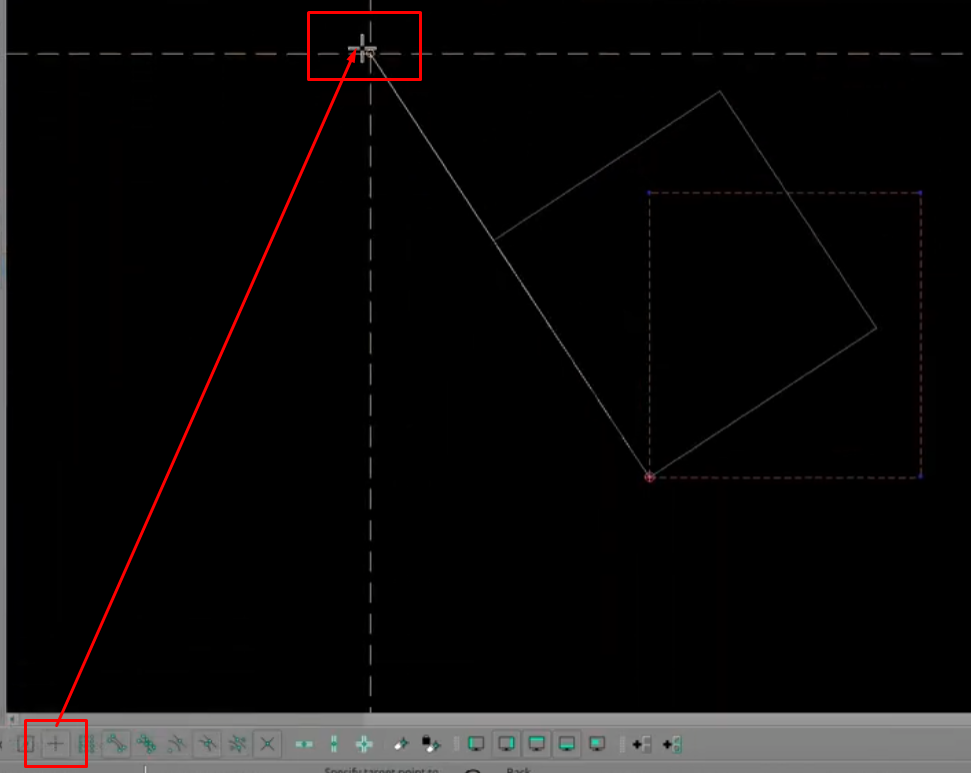
I suspect the situation is the following: 1) when you snap at 0:19 you try to snap to the endpoint of line (which is natural) 2) however, as free snap is enabled, reference point is snapped not the endpoint of line as you expect, but to some point that is on the left side from it. 3) for sure, the angle of line from that point to rotation center is different than the angel from rotation center to endpoint of line 4) due to different angles - you see that difference in rotation result. The image below illustrates my considerations:
|
|
https://www.youtube.com/watch?v=Rfu-erpR6Jg
You're right, the problems occur with arbitrary angles, perhaps decimal angles or something like that. First, I drew a line using the angle line tool and a rectangle, then rotated it, and it matched perfectly, even in freesnap. Second try: I drew a line in freesnap mode, then turned off freesnap and tried to match the rectangle to the line's angle, and it failed. |
|
.Version: 2.2.2.5-alpha Compiler: GNU GCC 13.3.0 Compiled on: Apr 8 2026 Qt Version: 6.4.2 Boost Version: 1.83.0 System: Debian GNU/Linux 13 (trixie)
This version of LibreCAD fixed the problem of angles not matching, but the reference system doesn't work as expected; it becomes more complicated with angles that are not vertical or horizontal to X and Y. https://www.youtube.com/watch?v=ZRWxWC1P8Gc is amazing how many new futures librecad alpha have in this short time. |
|
It looks okay to me:
1select entities; 2 rotate 3 select the reference point 4 select the rotation center 5 select the target point The result: the reference point is rotated around the center to be aligned with the target point by the angle to the rotation center
|
| Free forum by Nabble | Edit this page |

