Curved Text?

Previous Topic Next Topic
 
classic Classic list List threaded Threaded
7 messages Options
Reply | Threaded
Open this post in threaded view
|

Curved Text?

Spinnaker
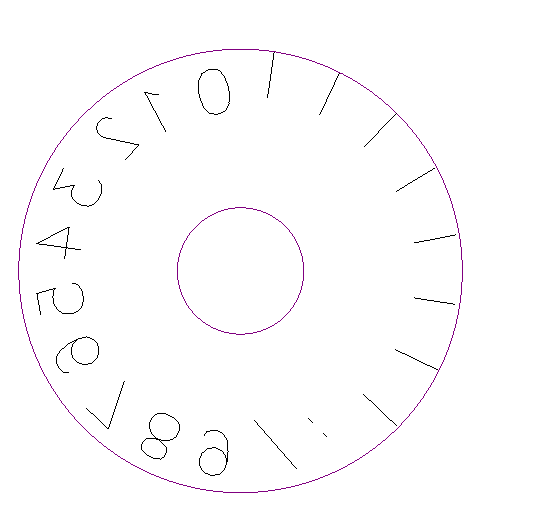
Any way to do curved text without manually placing it on the drawing?    What I would like to do is to place the characters 01234567890   in a circle all precisely paced  apart at a distance or angle that I specify .

Reply | Threaded
Open this post in threaded view
|

Re: Curved Text?

LordOfBikes
Administrator
This is not a typical CAD feature and there is no 'curved text' tool in LibreCAD.
You can do it step by step, letter by letter.

Or you can use DTP software like inkscape. Curved text shouldn't be a problem in inkscape and you can export to DXF format.
But, I haven't tried that yet, no practical experience.

Armin
investing less than half an hour into Search function can save hours or days of waiting for a solution
Reply | Threaded
Open this post in threaded view
|

Re: Curved Text?

Philip
In reply to this post by Spinnaker
While there is no direct way to add curved text in LibreCAD, your CNC machine might have the ability to do so.  I work with a Milltronics CNC and it does have that ability.  I don't know if all machines do or not.
Reply | Threaded
Open this post in threaded view
|

Re: Curved Text?

Spinnaker
It was a bit tedious but I was able to do it in LibreCAD.   I created a geometry to segment the circle then placed the numbers.

Reply | Threaded
Open this post in threaded view
|

Re: Curved Text?

ubiquitous
Well done!
LibreCAD doesn't have some of the sophisticated mathematical solutions built in like some of the expensive proprietary software but, with a bit of geometry and drafting knowledge, there is usually a workaround: even if it can be a little slow and tedious at times.
Reply | Threaded
Open this post in threaded view
|

Re: Curved Text?

Geo42
Bonjour,
Avec l'outil "Rotation" vous pouvez créer avec précision des copies multiples d'un objet ou d'un caractère.
Exemple :
Vous pouvez ainsi faire une copie en cercle de "0" en cochant "copies multiples", en choisissant "35" et un angle de 10°.
Vous obtiendrez ainsi 36 "0" répartis tous les 10°.
Ensuite à l'aide de l'outil "Propriétés" vous pourrez remplacer successivement les "0" par "10", "20", "30", etc pour avoir vos 360°.
Pareil pour les graduations . . .
Voilà.
Dans le même ordre d'idées il est assez facile d'automatiser les lignes de commande dans un tableur (Calc pour moi).
J'essaie de joindre mon exemple, si ça marche il suffit de copier la colonne S (sans le titre) et de la coller dans la ligne de commande de LibreCad. (c'était pour faire une règle à calcul circulaire)
Ech_Log_Lin-Circ.ods
Reply | Threaded
Open this post in threaded view
|

Re: Curved Text?

flywire
A screenshot of the output would be nice.