Korean text is not displayed correctly

Next Topic
 
classic Classic list List threaded Threaded
3 messages Options
Reply | Threaded
Open this post in threaded view
|

Korean text is not displayed correctly

Urstein
Hello.
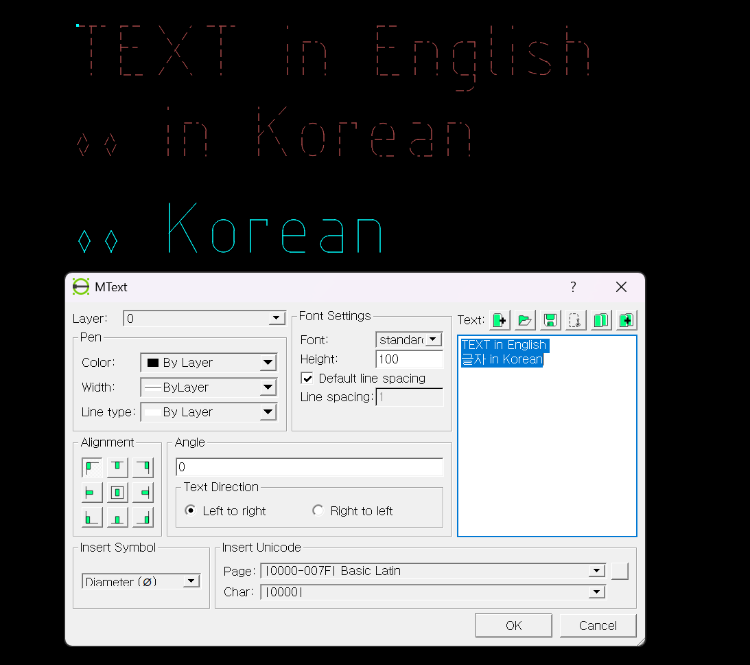
When I enter text in Korean, it is not displayed correctly.
In the text editor, Korean appears normally while typing.
I would like to know the solution.
Reply | Threaded
Open this post in threaded view
|

Re: Korean text is not displayed correctly

dxli
Hi Urstein,

LibreCAD relies on its own LFF font library for text rendering.

The current official releases come without any font file with Korean support.

A quick solution is to install a korean font file and restart LibreCAD to select the proper font.

You can download the wqy-unicode.lff from the page:

https://dokuwiki.librecad.org/doku.php/community:fonts

The page also contains instructions on how to create convert TTF fonts to LFF.


Urstein wrote
Hello.
When I enter text in Korean, it is not displayed correctly.
In the text editor, Korean appears normally while typing.
I would like to know the solution.
Reply | Threaded
Open this post in threaded view
|

Re: Korean text is not displayed correctly

Urstein
This post was updated on .
Thanks to your guidance, I was able to view Korean text in LibreCAD. Thank you.

However, as stated in the manual, I noticed that for non-English characters, the font strokes are displayed only as hollow outlines rather than filled shapes.
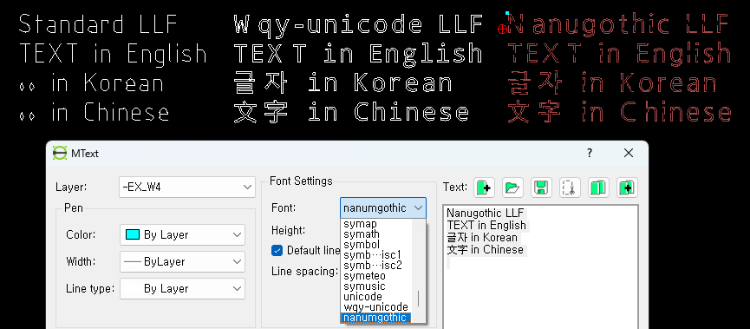
Although I haven’t searched extensively, it seems that support for Chinese characters and Korean is still not sufficient.

I hope that support for Korean will improve further in the future.
- - -
EDIT
Typo:    LLF -> LFF