Well, maybe not a new subject - just an eternal one - grids

Next Topic
 
classic Classic list List threaded Threaded
16 messages Options
Reply | Threaded
Open this post in threaded view
|

Well, maybe not a new subject - just an eternal one - grids

LarryB
I've seen lots of posts to and about LibreCad complaining about the metric grid being the only option.  Surely the maintainers could include an option for imperial measurements (feet and inches).  I've even seen posts that show some kind of code that appears to do that - but I don't know how to incorporate it.  And I don't want to mess with it.

So I'll have to continue dual booting Linux and Windows just to run TurboCad (2D).  And yes, I could run TurboCad in Linux via the Windows simulator, albeit a little flaky (yes, I've done it).  But I don't understand what the reluctance is to add the imperial measurements.

Let me explain why that's so important to me.  I'm a model railroader.  I like to build my own rolling stock (box/tank/stock/etc) and structures (factories/houses/stations/barns/granaries).  Not only is it satisfying, but it also saves considerable money.  It would be so nice to do it in LibreCad.  

I've looked at other 2D CAD packages that run under Linux, but LibreCad appears to be the best.  If only it spoke English!
Reply | Threaded
Open this post in threaded view
|

Re: Well, maybe not a new subject - just an eternal one - grids

flywire
Reply | Threaded
Open this post in threaded view
|

Re: Well, maybe not a new subject - just an eternal one - grids

sand1024
In reply to this post by LarryB
Imperial grid is supported as well as metric one.

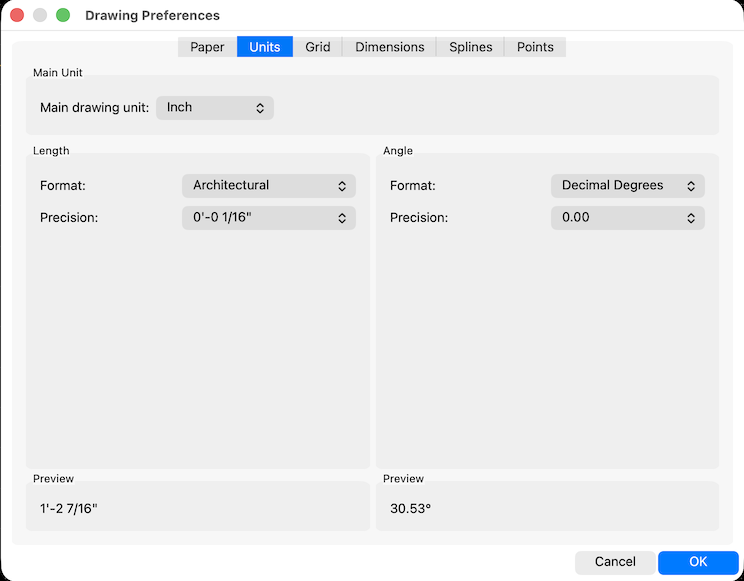
In order to enable it - you need to change drawing units of the drawing (in Drawing options dialog) to one of imperial units (like inches).
Reply | Threaded
Open this post in threaded view
|

Re: Well, maybe not a new subject - just an eternal one - grids

LordOfBikes
Administrator
It's probably not the grid, because LibreCAD just works in units. And the meaning of an unit is set in drawing preferences. Thus you can work with 1 unit is 1 inch.

The issue is the non linear scaling and fraction system of imperial units. It's more worse when it comes to architectural sizes when foot and yard are involved.
From programmers point of view this is a nightmare. It is not just text to number conversion, it is advanced parsing needed to get units and fractions correct. And the reverse procedure is needed for annotating.
There is no fixed grid in LibreCAD, grid is increased/decreased by factor 10 on zoom in/out. In imperial this is also not easy, using factor 4 or 8 for the grid might work for zoom in, but zooming out it will be wrong as it does not match with foot/yard factors.

Basically this is possible, for sure, but it will need a considerable amount of effort to do it correct.
There was no developer so far and none in sight, who take this battle.

There are some work arounds here in the forum how to handle the imperial issues, try to search for inch might deliver some usable results.
So it is possible to enter math expressions in command line and most input fields when units is set to inch.
E.g. for 3/8" enter 3/8 or 2 7/8" is 2+7/8 or 2'5" is 2*12+5.
For annotation you have to modify the dimension manually with Modify->Preferences to have imperial notation.

I'm used to decimal units, but I rarely rely on the grid myself. I prefer using the command line where I can enter accurate relative distances or construct shapes using parallel, angle and circles with appropriate snap settings and trimming afterwards.
investing less than half an hour into Search function can save hours or days of waiting for a solution
Reply | Threaded
Open this post in threaded view
|

Re: Well, maybe not a new subject - just an eternal one - grids

dxli
Actually, it's not hard to tweak the grid to follow the english architecture grid normals.

I am pretty sure it's about one week's work. With the current AI coding capabilities, it probably mean a solid day's work in developer time.

LordOfBikes wrote
It's probably not the grid, because LibreCAD just works in units. And the meaning of an unit is set in drawing preferences. Thus you can work with 1 unit is 1 inch.

The issue is the non linear scaling and fraction system of imperial units. It's more worse when it comes to architectural sizes when foot and yard are involved.
From programmers point of view this is a nightmare. It is not just text to number conversion, it is advanced parsing needed to get units and fractions correct. And the reverse procedure is needed for annotating.
There is no fixed grid in LibreCAD, grid is increased/decreased by factor 10 on zoom in/out. In imperial this is also not easy, using factor 4 or 8 for the grid might work for zoom in, but zooming out it will be wrong as it does not match with foot/yard factors.

Basically this is possible, for sure, but it will need a considerable amount of effort to do it correct.
There was no developer so far and none in sight, who take this battle.

There are some work arounds here in the forum how to handle the imperial issues, try to search for inch might deliver some usable results.
So it is possible to enter math expressions in command line and most input fields when units is set to inch.
E.g. for 3/8" enter 3/8 or 2 7/8" is 2+7/8 or 2'5" is 2*12+5.
For annotation you have to modify the dimension manually with Modify->Preferences to have imperial notation.

I'm used to decimal units, but I rarely rely on the grid myself. I prefer using the command line where I can enter accurate relative distances or construct shapes using parallel, angle and circles with appropriate snap settings and trimming afterwards.
Reply | Threaded
Open this post in threaded view
|

Re: Well, maybe not a new subject - just an eternal one - grids

LarryB
To all who replied, thanks.

Yes I can set the units to inches, but the major lines are still 10 units apart - 12 would be nice :-).

As far as small units, I can only suggest what TurboCad does - it allows me to repeatedly halve or double the grid spacing to get to the resolution I need.

So why don't I just run TurboCad and forget looking for a Linux solution?  Running Windows (W10 in my case) just to run TurboCad allows Microsoft to do all sorts of things in the background without any indication of what they are doing.

And I recently purchased the latest 2D version of TurboCad and found that the interface bore no resemblance to the one I'm used to.  And they want extra money to allow me to run it on both my computers.

Another nice feature of TurboCad is the ability to resize the drawing for printing.  Example: that allows me to draw the plans for a stock car in actual size (~36') and print it out in any scale (HO,S,O) that I want.

P.S.  I have to brag a little here - I started programming computers in the late 1950s.  Univac was the second computer I programmed - the first was Readix, which nobody ever heard of.  It's been a long journey, but it's seldom been boring.  A lot of it was SCADA stuff - I even did a little bit for the space shuttle simulator.  I'll be 90 next year, and doing a little C programming on Arduino micros to control stuff on my model railroad is about my limit.  And I need my K&R manual for that :-).

So I'll gladly pass the baton to folks like you - good luck.


Reply | Threaded
Open this post in threaded view
|

Re: Well, maybe not a new subject - just an eternal one - grids

dxli
hi LarryB,

My respect to you! Like the Chinese saying, "Living to old ages, learn to old old ages"(roughly).

Coding is becoming much easier today. Free AI coding tools allow you to improve software with minimal effort. AI can handle development tools, like Git for version control and CMake for building, so you no longer need to worry about steep learning curves or tricky commands.

I know it's easier said than done.

I'm currently in the middle of heavy DWG support implementation, but I do expect to have time to implement the English grid style in a few days, and the new feature will go to the development branch (master, 2.2.2_alpha):

https://github.com/LibreCAD/LibreCAD/releases/tag/2.2.2_alpha-latest

LarryB wrote
To all who replied, thanks.

Yes I can set the units to inches, but the major lines are still 10 units apart - 12 would be nice :-).

As far as small units, I can only suggest what TurboCad does - it allows me to repeatedly halve or double the grid spacing to get to the resolution I need.

So why don't I just run TurboCad and forget looking for a Linux solution?  Running Windows (W10 in my case) just to run TurboCad allows Microsoft to do all sorts of things in the background without any indication of what they are doing.

And I recently purchased the latest 2D version of TurboCad and found that the interface bore no resemblance to the one I'm used to.  And they want extra money to allow me to run it on both my computers.

Another nice feature of TurboCad is the ability to resize the drawing for printing.  Example: that allows me to draw the plans for a stock car in actual size (~36') and print it out in any scale (HO,S,O) that I want.

P.S.  I have to brag a little here - I started programming computers in the late 1950s.  Univac was the second computer I programmed - the first was Readix, which nobody ever heard of.  It's been a long journey, but it's seldom been boring.  A lot of it was SCADA stuff - I even did a little bit for the space shuttle simulator.  I'll be 90 next year, and doing a little C programming on Arduino micros to control stuff on my model railroad is about my limit.  And I need my K&R manual for that :-).

So I'll gladly pass the baton to folks like you - good luck.
Reply | Threaded
Open this post in threaded view
|

Re: Well, maybe not a new subject - just an eternal one - grids

sand1024
@dixli

Well, please don't rely on AI neuroslop code - or at least add it into the codebase with really great caution. Based on my experience (regardless of specific models, unfortunately) - AI it's more or less fine for finding some expirations or quick & dirty checks of small things - but the direct usage of it in production leads to non-satisfactory results (both in code quality and, what is worse, in algorithm logic, where errors may be quite subtle and hard to find).

Of course, AI is evolving and things will be better with time, yet now it's indeed just a T9 on steroid, after all..

As for grid - yes, that might be nice (yet not high priority, as for me) - but before switching to it, probably it's better to finalize and merge https://github.com/LibreCAD/LibreCAD/pull/2540?
I have to merge your changes from master to it again, and I'm afraid that with more changes it will require more efforts to integrate that PR.

Reply | Threaded
Open this post in threaded view
|

Re: Well, maybe not a new subject - just an eternal one - grids

LarryB
In reply to this post by dxli
Thank you.  I look forward to seeing and trying the result.
Reply | Threaded
Open this post in threaded view
|

Re: Well, maybe not a new subject - just an eternal one - grids

flywire
In reply to this post by LarryB
LarryB wrote
I can set the units to inches, but the major lines are still 10 units apart - 12 would be nice :-).
There are many variations in imperial units other than " and ', better to allow user definable grid spacing.
Reply | Threaded
Open this post in threaded view
|

Re: Well, maybe not a new subject - just an eternal one - grids

dxli
In reply to this post by sand1024
@sand1024

AI coding is just a tool, more powerful than our previous ones.

Let's not go as far as the strawman fallacy by asking whether AI is perfect. It's a new type power tools, as dangerous or powerful as one can verify.

My basic understanding is that it's not much more dangerous than human coders, if we just review how many crashing bugs were added to our codebase by human coders.

The positive side, we now have pretty good understanding of our software, including V3, as well as our customers. AI can quickly help. Just as the translation project I just did, it was not smooth, and not by AI alone, but it did progress much faster, while I can only read Chinese, English and French.

With the power of AI coding, I do want to update our V3, since the learning curve is not steep anymore.

sand1024 wrote
@dixli

Well, please don't rely on AI neuroslop code - or at least add it into the codebase with really great caution. Based on my experience (regardless of specific models, unfortunately) - AI it's more or less fine for finding some expirations or quick & dirty checks of small things - but the direct usage of it in production leads to non-satisfactory results (both in code quality and, what is worse, in algorithm logic, where errors may be quite subtle and hard to find).

Of course, AI is evolving and things will be better with time, yet now it's indeed just a T9 on steroid, after all..

As for grid - yes, that might be nice (yet not high priority, as for me) - but before switching to it, probably it's better to finalize and merge https://github.com/LibreCAD/LibreCAD/pull/2540?
I have to merge your changes from master to it again, and I'm afraid that with more changes it will require more efforts to integrate that PR.
Reply | Threaded
Open this post in threaded view
|

Merging PR #2540 and adopting AI in LibreCAD

usuario
In reply to this post by sand1024
A couple of weeks ago, I had the opportunity to try the LibreCAD 2.2.2.6-alpha version, which includes all the changes from PR #2540. The work done is truly remarkable, and I hope it can be merged soon so the community can start exploring the new features, reporting bugs, and contributing suggestions.

I want to highlight the effort of the volunteer contributors who keep this project alive. With so few resources, every contribution makes a huge difference, and this version demonstrates how much can be achieved with dedication and passion.

Regarding the use of AI in LibreCAD, I completely agree with its adoption. New tools are made to be used, always with caution, as you well mentioned. Personally, I believe this would allow us to incorporate features that would otherwise be very difficult to develop in a project with so few contributors. AI is evolving rapidly and can become a valuable asset to review, debug, and optimize the code it generates itself, freeing up time for the community to focus on more creative tasks.

I am convinced that these new tools, along with the community's collaboration, can take LibreCAD to a whole new level.

Best regards,

Usuario
Reply | Threaded
Open this post in threaded view
|

Re: Merging PR #2540 and adopting AI in LibreCAD

dxli
@usuario,

I'm quite busy on DWG support, so I haven't looked into sand1024's PRs.

I got the impression sand1024 would merge them when they are ready.

If it's a permission issue, I do think sand1024 should be granted merging permissions.


usuario wrote
A couple of weeks ago, I had the opportunity to try the LibreCAD 2.2.2.6-alpha version, which includes all the changes from PR #2540. The work done is truly remarkable, and I hope it can be merged soon so the community can start exploring the new features, reporting bugs, and contributing suggestions.

I want to highlight the effort of the volunteer contributors who keep this project alive. With so few resources, every contribution makes a huge difference, and this version demonstrates how much can be achieved with dedication and passion.

Regarding the use of AI in LibreCAD, I completely agree with its adoption. New tools are made to be used, always with caution, as you well mentioned. Personally, I believe this would allow us to incorporate features that would otherwise be very difficult to develop in a project with so few contributors. AI is evolving rapidly and can become a valuable asset to review, debug, and optimize the code it generates itself, freeing up time for the community to focus on more creative tasks.

I am convinced that these new tools, along with the community's collaboration, can take LibreCAD to a whole new level.

Best regards,

Usuario
Reply | Threaded
Open this post in threaded view
|

Re: Well, maybe not a new subject - just an eternal one - grids

sand1024
In reply to this post by dxli
@dxli

Well, actually that was a side note from my side regarding AI that is based on my experience.

You're right - it's just a tool that might be used.

My major point was just using it's with caution and don't believe in AI results too much. Sometimes they are fine, sometimes they are not.

For sure, in most cases first results produced by AI are crap - it's a really funny game to ask AI to perform detailed code review of it's own solution - and see how many errors it discovers in the same code that it just confidently generated.  Unfortunately, that's generally true for any model I've tried so far...  

Yet with some iterations of generation/review/generation cycles - results may be improved to something useful (of course, if there are no AI hallucinations - yet that's a different area).  

Thus while AI may definitely deliver it's value may save time - I think relying on them without quite a detailed review and checking is a source of potential support and runtime issues, so we just have to be careful there.
Reply | Threaded
Open this post in threaded view
|

Re: Merging PR #2540 and adopting AI in LibreCAD

sand1024
In reply to this post by dxli
@dxli

Yes, I can merge changes from the master to my branch and then merge PR into master in couple of days - just please provide me permissions if you're busy to do that merge by yourself.

Or I can wait until you finalize your current activity, put it into master and do the merge after that (so it will not require a merge from your side), whatever is convenient.  Yet if your changes are mostly in libdxfw at the moment - I suppose the merge should be smooth.
Reply | Threaded
Open this post in threaded view
|

Re: Merging PR #2540 and adopting AI in LibreCAD

LordOfBikes
Administrator
sand1024 wrote
please provide me permissions
Invitation sent
investing less than half an hour into Search function can save hours or days of waiting for a solution