only empty boxes/frames are shown for image/text? no line thickness?

Next Topic
 
classic Classic list List threaded Threaded
20 messages Options
Reply | Threaded
Open this post in threaded view
|

only empty boxes/frames are shown for image/text? no line thickness?

dxli
This post was updated on .
only empty boxes/frames are shown for image/text? no line thickness?

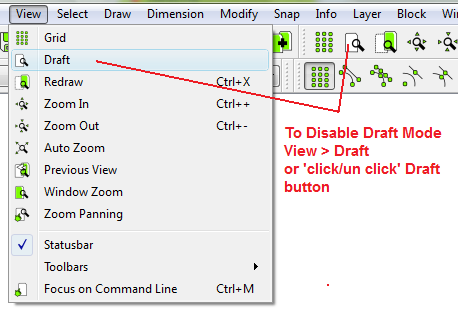
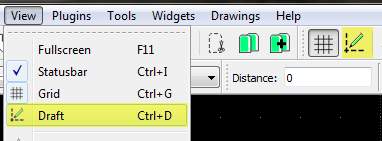
You need to disable "Draft" mode. Make sure you uncheck the following item:

Main menu: View->Draft
Reply | Threaded
Open this post in threaded view
|

Re: only empty boxes/frames are shown for image/text? no line thickness?

sp1der
Reply | Threaded
Open this post in threaded view
|

Re: only empty boxes/frames are shown for image/text? no line thickness?

LordOfBikes
Administrator
The Icon has changed since version 2.1

investing less than half an hour into Search function can save hours or days of waiting for a solution
Reply | Threaded
Open this post in threaded view
|

Re: only empty boxes/frames are shown for image/text? no line thickness?

dcas2020
Thank you Lord of Bikes,
 ' draft ' mode was set and  causing my problem,
cleared it and OK now.
cheers,
Denis
Reply | Threaded
Open this post in threaded view
|

Re: only empty boxes/frames are shown for image/text? no line thickness?

follaiv@alice.it
In reply to this post by dxli
Thanks a lot I solve the problem by click on the Draft Mode as you suggest
Reply | Threaded
Open this post in threaded view
|

Re: only empty boxes/frames are shown for image/text? no line thickness?

dxli
I the latest development version, "Draft" will be shown on in the corners of the drawing view. Hopefully, we will confuse users less.
Reply | Threaded
Open this post in threaded view
|

Re: only empty boxes/frames are shown for image/text? no line thickness?
PatrickNC
To dxli: I just read your message about new "Draft" messages, 4 months later.  I'm still reading posts about dimension problems while printing.  Always issues in software development between including it one simple way versus alternative options.  At least a "Draft" message of some sort get users onto a track to a solution. I'm not sure how well it will work but at least it's an effort to address the problem.

Reply | Threaded
Open this post in threaded view
|

Re: only empty boxes/frames are shown for image/text? no line thickness?
Christian
Hello,
I do have the problem of text (dimensions or TEXT tool) only showing an empty rectangle while  draft mode is NOT ON.
At the moment I am stuck.

Well I am now unstuck: I just closed the program and re-opened it. It was just a local bug (the bugger!)

Matter closed for me
Reply | Threaded
Open this post in threaded view
|

Re: only empty boxes/frames are shown for image/text? no line thickness?
Micke77
In reply to this post by dxli
Dziękuje bardzo.
Reply | Threaded
Open this post in threaded view
|

Re: only empty boxes/frames are shown for image/text? no line thickness?

Micke77
In reply to this post by LordOfBikes
Dziękuję za pomoc, pozdrawiam.
Reply | Threaded
Open this post in threaded view
|

Re: only empty boxes/frames are shown for image/text? no line thickness?

dxli
In reply to this post by Christian
Please note, when the rendered text is determined to be too small (consider the extreme, if the whole text is only 1 pixel in height), only a bounding box is drawn, i.e. the behavior of Draft mode.

Christian wrote
Hello,
I do have the problem of text (dimensions or TEXT tool) only showing an empty rectangle while  draft mode is NOT ON.
At the moment I am stuck.

Well I am now unstuck: I just closed the program and re-opened it. It was just a local bug (the bugger!)

Matter closed for me
Reply | Threaded
Open this post in threaded view
|

Re: only empty boxes/frames are shown for image/text? no line thickness?

pkemner
I'm having a similar problem.
Version: 2.2.0-undef
Compiler: GNU GCC 13.2.0
Compiled on: Apr  8 2024
Qt Version: 5.15.13
Boost Version: 1.83.0
System: Linux Mint 22.1

I open librecad and load my drawing.
I add a dimension line. The measurement appears.
I pan the image- all measurements change to empty boxes.
Save the image, exit, reopen librecad and open the drawing- the measurements are there.  
I can select a window or zoom out or in, and the measurements are still there. If I pan the image, it's all empty boxes.
Reply | Threaded
Open this post in threaded view
|

Re: only empty boxes/frames are shown for image/text? no line thickness?

Urstein
In reply to this post by dxli
Does turning on draft mode only display dimensions and text as rectangles to reduce the screen rendering burden and make the screen more responsive? Is this the same effect as classifying dimensions and text into layers and hiding those layers?
Reply | Threaded
Open this post in threaded view
|

Re: only empty boxes/frames are shown for image/text? no line thickness?

sand1024
>Is this the same effect as classifying dimensions and text into layers and hiding those layers?
no.  

Draft mode is mode with simplified rendering (mostly for performance and historical reasons), where
1) text is not drawn (both in Text, MText and dimensions).
2) image - drawn just using boundary box
3) hatch - not drawn.

Layer, on the contrary, is used for different completely things (from the usability point of view) - it's rather logic grouping of entities.

When layer is not visible, all entities that belongs to it are not drawn.
Reply | Threaded
Open this post in threaded view
|

Re: only empty boxes/frames are shown for image/text? no line thickness?

Urstein
This post was updated on .
sand1024 wrote
Draft mode... historical reasons..
I wonder what kind of history there is. If you know, could you share it with people like me?
- - - - - - - - - -
EDIT
2026.4.25
Generative AI explained that the historical reason and the performance reason are essentially the same, both stemming from the need for performance optimization in the low‑spec PC era of the 1990s to early 2000s.
- - - - - - - - - -
Reply | Threaded
Open this post in threaded view
|

Re: only empty boxes/frames are shown for image/text? no line thickness?

flywire
Urstein wrote
the need for performance optimization in the low‑spec PC era of the 1990s to early 2000s.
- - - - - - - - - -
It's all relative but I'd have thought this would have referred to 1980s. Wasn't uncommon to let a PC run for hours or overnight to render.
Reply | Threaded
Open this post in threaded view
|

Re: only empty boxes/frames are shown for image/text? no line thickness?

Urstein
I am still curious. If the ‘draft mode’ function was added 20–40 years ago due to PC performance limitations, was it because layer functionality did not exist at the time? Or, even if layers were available and one could hide text, images, and hatches, was it that such methods did not achieve the same performance improvement as draft mode? (Of course, switching to Draft Mode at once is more convenient than creating separate layers for text, images, hatches, and dimensions and then hiding or showing them individually.)

https://forum.librecad.org/Grouping-or-combining-several-entities-into-one-entity-or-element-td5709681.html
In LibreCAD, since the ‘Block’ function already exists, it seems the ‘Group’ function was not added. In the same way, since layers can handle visibility, adding a separate ‘draft mode’ feels somewhat contradictory. My curiosity is simply whether there was any historical reason beyond performance.
Reply | Threaded
Open this post in threaded view
|

Re: only empty boxes/frames are shown for image/text? no line thickness?

flywire
I don't think you understand what performance is all about. Imagine if you zoomed or panned slightly and your machine was locked up for minutes or hours while the image rendered. You'd soon turn on draft mode.

These days it is more of a convenience to reduce screen clutter.
Reply | Threaded
Open this post in threaded view
|

Re: only empty boxes/frames are shown for image/text? no line thickness?

Urstein

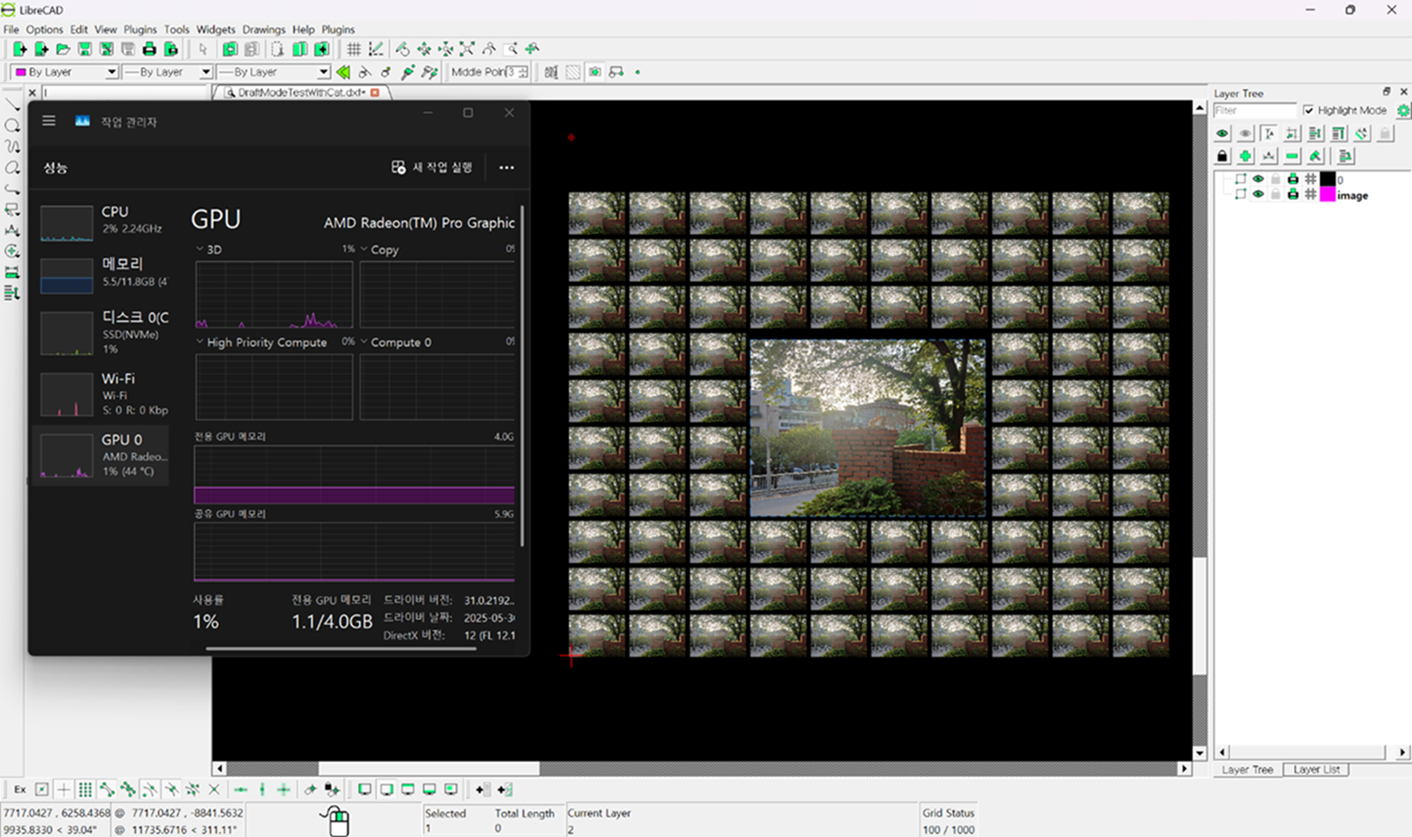
I inserted many images and checked the Windows Task Manager while refreshing the screen. I expected GPU activity to be lowest when Draft Mode was turned on. However, contrary to my expectations, whether Draft Mode was on or off, GPU usage on my PC stayed around a maximum of 30%, with almost no noticeable difference. I even tried creating a layer named “image” to hide the drawings, but the result was the same.

Of course, compared to PCs from 30 years ago, my machine’s graphics performance is much better, but since I bought this laptop about four years ago, it’s not particularly high-end. Perhaps with much larger and more complex drawings (or on much lower-performance PCs, like those we might find in a museum), the effect of Draft Mode would become more apparent. For now, though, I honestly don’t really see the benefit of Draft Mode.
Reply | Threaded
Open this post in threaded view
|

Re: only empty boxes/frames are shown for image/text? no line thickness?

LordOfBikes
Administrator
Nice, that you have a performant system and don't need draft mode.
Anyhow, there are for sure users using LibreCAD on an old box in their shop or on a raspi pi. They are still happy to have draft mode.
investing less than half an hour into Search function can save hours or days of waiting for a solution