|
Ich arbeite mit der Version 2.2.1.2 von libreCAD und u.a. mit DXF Dateien der Katasterverwaltung
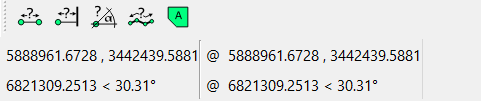
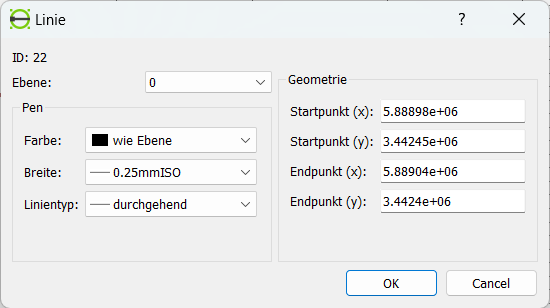
Hier 2 Koordinaten aus dem Datensatz. 34 42 400.620 / 58 89 404.920 34 42 450.810 / 58 88 979.690 Ich kann sie eingeben und die Linie wird dargestellt und ich kann damit arbeiten. Sie Kursorkoordinaten werden im Fuß des Fensters auch richtig dagestellt. ![]() Ich kann die Attribute der Linie abfragen. Wenn ich jedoch einen Doppel Click auf die Linie (es kann auch ein Kreis sein) absetze, werden mir die Koordinaten verkürzt dargestellt. Siehe Bild unten. ![]() Der Wert von Startpunkt (x) entspricht 5888980,000 muß aber 5888979,689 sein. Bestätige ich dann die Daten mit OK wird die Linie oder der Kreis verschoben, da nur die verkürzten Koordinaten übernommen werden. Beim Auslesen oder Darstellen der Koordinaten im obigen Fenster geschieht der Fehler. Hier müssen die Koordinaten wie ganz oben dargestellt ausgegeben werden. Ich kann die Koordinaten richtig in das Fenster eingeben, dann wird die Linie auch richtig dargestellt. Bitte den Fehler beim nächsten? Update korrigieren. Mit freundlichem Gruß Ubbo Dörries |
|
This is a known issue: default property editing uses the default Qt number to string conversion, which keeps only 6 significant digits by default.
while each fix is trivial, the issue is to keep all affected areas fixed. This is not out of reach for 2.2.1.3 though.
|
|
@dxl
yes, I think some uniform policy for editing should be selected. It seems that the amount of digits that is entered in input fields (properties of entity, options for actions) should be set large enough to ensure that precision is not lost. I wonder how that should be related to drawing settings realated to unit precisions... should units precision settings just be used for displaying the values? And for the editing - some larger precision should be shown? Anyway, I'll investigate this more. @BUBU As far as I can see, in 2.2.2 alpha branch (https://github.com/LibreCAD/LibreCAD/releases/tag/2.2.2_alpha-latest) the default precision is set to 10 digits instead of 6 - probably that will help? |
No, there is no help, precision should be users requirement and no more. It should be based on CAD standards. For example, 12 * 30° = 360° rather than some arithmetic precision value often (wrongly) displayed in LibreCAD. iirc this issue now occurs in https://dokuwiki.librecad.org/doku.php/tutorial:carport Precision also becomes an issue with unit conversion, eg 25mm is usually close enough to 1" but 8' is just over 1 1/2" short of 2.4m. Sometimes this precision is within tolerance but other times not. |
Well, it seems that my previous comment was just misleading, sorry for that. Actually, I'd like to address the following: 1) internally, values are stored as floating point numbers (double precision) 2) When the dialog is shown, these values are converted to strings (to be shown in input editors) 3) The precision of this conversion (how many digits are shown in STRING) - is larger in 2.2.2 Thus my comment was rather related to the way on how to determine the number of digits that should be shown in such string values. Mostly, that's applicable for such input fields like entity's property dialog and action options bar. Additionaly - there are settings in drawing that defines linear and angular unit precision, yet I'm not sure so far whether these settings should control such a double->string conversion. |
Without attempting to provide a definitive answer to the broader issue I think this is the answer to displays such as Tools Options menu and Status Bar. |
|
wenn ich mich noch einmal einschalten darf.
Die 10 Stellen zum Umwandeln der Werte für das Fenster ist OK. Ich fände es aber ideal, wenn nur die Werte in dem Fenster zurückgegeben werden, die geändert wurden. Da die internen Werte die doppelte Genauigkeit haben, werden Koordinatenwerte die mit 10 Stellen ausgelesen und zurückgegeben werden nicht mehr die gleiche Genauigkeit wie vor der Rückgabe, was zu kleinen Ungenauigkeiten führen kann. Gerade wenn der Punkt ein Tangentialpunkt eines Kreise an eine Gerade ist, führt die Kürzung der Koordinaten auf 10 Stellen dazu, das der Schnittpunkteventuell nicht mehr als solcher erkannt wird. Mit allen guten wünschen zum neuen Jahr Ubbo Dörries |
|
for short term workaround, try 2.2.2, with default 10 significant digits.
However, tangent points are another issue: we don't have a topological layer to specify tangential relations, and tangent points maybe recognized as intersections or not, due to rounding errors. The problem was reported long ago: https://github.com/LibreCAD/LibreCAD/issues/523
|
|
well, I suppose BUBU made a good suggestion regarding updating only those values of entities that were explicitly modified by the user.
For sure, such approach will not affect tangental relations, yet at least it will reduce the amount of suble precision loss issues in the drawing's entities which may occur due to to entityt's property editing dialog. I'll take a look to this and update the Properties dialog accordingly (in master). |
|
Ich bin es noch einmal.
mir ist aufgefallen das auf allen Seiten die Schaltfläche XA für die Übersetzung der Seite gezeigt wird, wie auch jetzt wenn ich einen Komentar schreibe. Nur wenn ich mir meine Posts ansehen will, fehlt die Schaltfläche und da ist sie für mich wichtig, da mein Koversationsenglich leider nur sehr rudimentär ist. Vieleicht könnt Ihr das ja mal bei Gelegenheit ändern. Euch allen einen guten Rutsch ins neue Jahr. BUBU |
| Free forum by Nabble | Edit this page |